SKU RZC-WADA

Montre intelligente Ryze Wave

La montre intelligente de sport et de bien-être Ryze Wave vous permet d'optimiser vos performances.
Prix ​​régulier $201.00 CAD Prix ​​de vente $201.00 CAD
Écran AMOLED Bracelet de montre antibactérien Exercices de respiration Moniteur de santé féminine Fréquence cardiaque et oxygène sanguin Moniteur de sommeil Suivi du sommeil et santé féminine Traqueur d'activité en mode sport Niveau de stress et exercices de respiration Surveillance du niveau de stress Suivi des pas, de la distance et des calories
COULEURS Black & Blue
Que vous soyez un amateur de sport ou que vous débutiez, la Ryze Wave peut suivre chaque étape de votre parcours de remise en forme. Son superbe écran AMOLED vous permet de voir des mesures de santé importantes et de surveiller les niveaux d'activité. De plus, grâce à la connectivité Bluetooth, vous pouvez passer des appels, écouter de la musique et recevoir des notifications.
  • Écran AMOLED
  • Suivi d'activité
  • Surveillance de la fréquence cardiaque, de l'oxygène sanguin et du niveau de stress
  • 70 modes sportifs
  • Appels et connectivité Bluetooth
  • Stockage MP3, lecture de musique et prise en charge TWS
  • Moniteur de sommeil
  • Moniteur de santé féminine
  • Entraînement respiratoire
*Veuillez noter qu'il ne s'agit pas d'un appareil médical.

The Ryze Wave fitness and wellbeing smartwatch tracks every stage of your fitness journey. From gym enthusiasts to newcomers, you’ll be empowered to become the champion you aspire to be. Ryze Wave is your catalyst for reaching new heights in personal performance. Not only can you track your activity levels, you can also monitor key biometrics for insight into body condition. You’re also able to call, text, play music and view social media notifications. Communicate, listen, run and workout with your Ryze Wave smartwatch.

Explore our full range of smart watches online, including our Ryze Trek and the Ryze Gene to find the best fit for you and your pursuit of wellbeing. Or check out the holistic health capability built into our sleek Ryze Element Smart Ring

*Please note, this is not a medical device.

Expédition
Nous nous efforçons d'expédier les commandes depuis notre entrepôt dans un délai d'un jour ouvrable à compter de l'achat, bien que cela puisse être retardé en raison de la disponibilité des articles ou d'un arriéré saisonnier. Les délais d'expédition standard estimés pour les zones métropolitaines sont de 2 à 5 jours ouvrables, mais pendant les périodes de forte activité, l'expédition peut prendre jusqu'à 10 jours. Voir toutes les informations d'expédition

Retours
Afin d'organiser un retour selon ces termes et conditions, vous devez nous en informer via le formulaire de contact dans les 30 jours suivant la réception de votre produit et demander un retour selon cette politique. Voir toutes les informations sur les retours

Nos produits sont assortis de garanties qui ne peuvent être exclues en vertu de la loi australienne sur la consommation. Vous avez droit à un remplacement ou à un remboursement en cas de défaillance majeure et à une indemnisation pour toute autre perte ou dommage raisonnablement prévisible. Voir les informations complètes sur la garantie

Améliorez vos performances à chaque étape

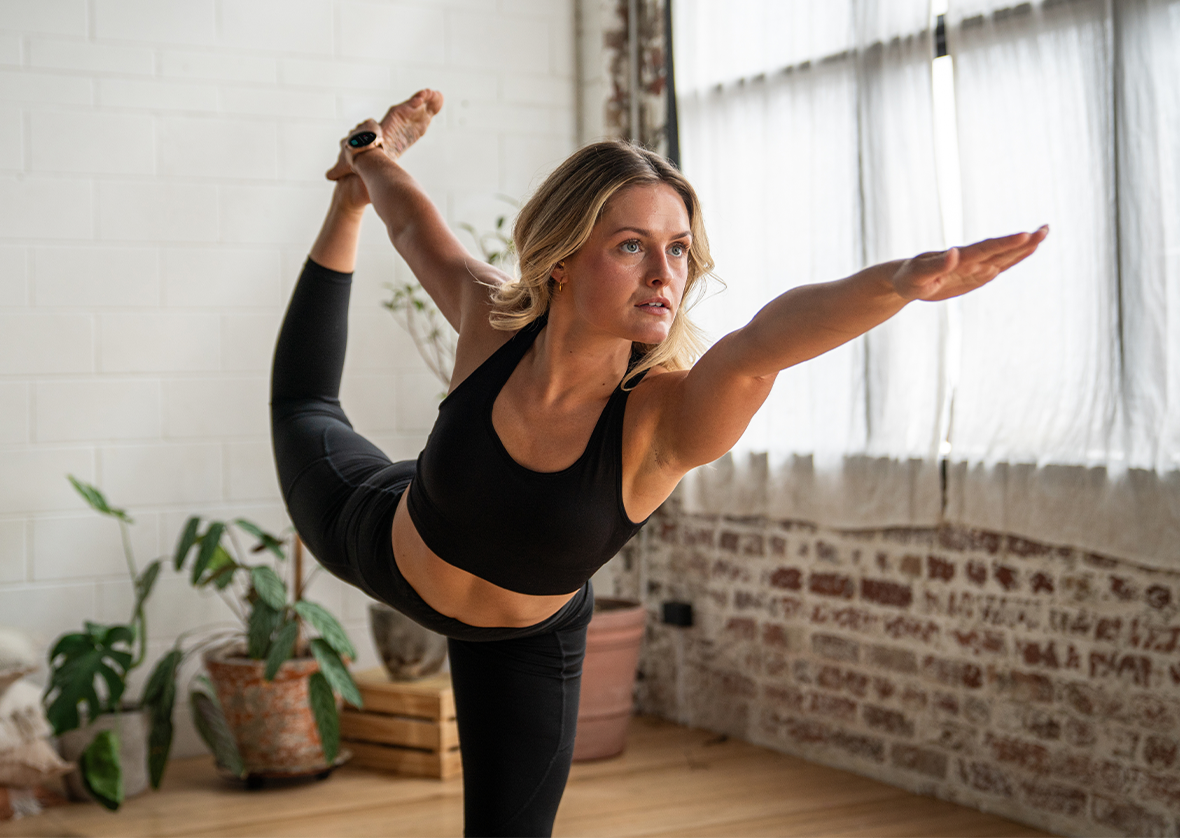
Ryze Wave est prêt à vous accompagner, où que votre parcours de bien-être vous mène. Un écran AMOLED et une connectivité Bluetooth s'associent avec puissance à sa capacité à suivre les niveaux d'activité.

70 modes sportifs 70 modes sportifs
Surveillance de la fréquence cardiaque, de l'oxygène sanguin et du niveau de stress Surveillance de la fréquence cardiaque, de l'oxygène sanguin et du niveau de stress
Suivi de la santé féminine Suivi de la santé féminine
Moniteur de sommeil Moniteur de sommeil
Appels et connectivité Bluetooth Appels et connectivité Bluetooth
Remise en forme et récupération

Préparez-vous à atteindre vos objectifs

Bien-être

Des fonctionnalités pour se sentir bien

Connectivité

Sentez-vous autonomisée. Soyez connectée.

Conception

Design athlétique et tonique

Qu'y a-t-il dans la boîte ?

1 x Ryze Wave Smartwatch

1 x Ryze Wave Smartwatch

1 x Additional strap

1 x Additional strap

Également inclus : 1 câble de charge et de données magnétique, et un manuel d’utilisation

Téléchargez l'application Ryze Fit

L'application est compatible avec les iPhone fonctionnant sous iOS 9.0 ou version ultérieure, et avec les smartphones Android fonctionnant sous Android 6.0 ou version ultérieure.

Rectangle_2601.png

Spécifications techniques

Découvrez comment Wave améliore vos performances.

Affichage AMOLED de 1,43 pouce
Résolution de l'écran 466 x 466
Capacité de la batterie 300 mAh
Entrée nominale 5 V = 1 A
Temps de charge Environ 3 heures pour une charge complète
Autonomie de la batterie* Jusqu'à 7 jours
Indice de protection IP68
Stockage MP3 512 Mo
Connectivité sans fil Bluetooth 5.2 BLE
Fréquence Bluetooth 2402 MHz - 2480 MHz
Dimensions de la montre 256,8 mm (L) x 46 mm (l) x 12,2 mm (é) (bracelet et protubérances inclus)
Largeur du bracelet de montre 20 mm
Longueur du bracelet de montre 121 mm/80 mm
Circonférence du poignet 140 mm - 200 mm
Compatibilité Versions Android 6.0 et iOS 9 et supérieures
Températures de fonctionnement -10 °C à 40 °C
Températures de chargement 0 °C à 40 °C
*L’autonomie utile de la batterie sera réduite en cas d’utilisation plus fréquente du suivi continu de la fréquence cardiaque, du suivi automatique de la santé, de l’activation de l’écran, des notifications par vibration, de la synchronisation des données avec l’application, des appels Bluetooth et d’autres fonctions.

Accessoires et pièces détachées

Questions fréquentes

Vous avez une question ? Consultez nos questions les plus fréquentes – elles pourraient vous aider à trouver rapidement la réponse dont vous avez besoin. Ou consultez notre Centre d'expertise pour plus d'informations utiles.

Wearing the Ryze smart watch

To get the most out of your Ryze smart watch, it’s important to make sure you’re wearing it properly so the monitors can gather data accurately.

How to wear your Ryze smart watch

Please ensure the smart watch is fastened comfortably, and if your skin becomes irritated, please take it off and let your skin breathe.
Skin irritation can happen for the following reasons.

  • Skin friction or rubbing
  • Skin exposure to irritants such as sweat, soap or other cleansers left on wearables
  • Pre-existing allergies

Not too tight

Wearing an overly tight watch can trap sweat and cause skin irritation as well as impact the monitor.

  • If you find the watch particularly uncomfortable to wear, please either adjust the watch strap or take it off.
  • If your skin becomes irritated, please stop wearing the watch for several hours or a few days until your skin has healed. If the symptoms persist or worsen, consider seeking medical advice.

Not too loose

Your watch should be snug but comfortable. If the wrist-based watch sensors are not reading your heart rate, try tightening the strap a little bit and keep the watch two finger widths above the wrist. Do loosen the watch after a workout.

Keep things dry and clean

It’s important to make sure your skin is dry before wearing your watch. Wearing a wet device for an extended period will irritate the skin.
After exercising, please make sure you thoroughly clean and dry your hands, wrist and watch strap.
Traces of soap, cleaners and detergents left on the device may irritate the skin.
Use ‘soap free’ cleaner when you clean your watch.

There are several steps to go through to pair your Ryze smart watch to the App. Please follow this link and refer to the relevant manual for your watch model, which has clear steps to guide you through the process.

Please scan this QR code to download the Ryze Connect App or review the manual for further information.


Your user data is securely stored on Amazon Web Servers (AWS). This means your Ryze wearer’s sensitive and private data is encrypted and won’t be leaked, accessed or seen by anyone-but you. Read more

The Ryze Wave has an IP68 protection rating that is used in the mobile phone industry. The rating defines a product’s protection against exposure to water and dust.

Ryze Wave is swim proof. This means the watch is suitable for shallow water activities including swimming. It can be worn during a cold-water shower, indoor pool and open water. The watch can survive spills and splashers.

The watch is NOT suitable for deep diving, in a spa/hot tub, in a hot spring, sauna or high temperature steam environment.

Try the following steps for troubleshooting.

  1. Press the device button and see if the screen lights up. If it does not, the battery level may have depleted. Please fully recharge the device battery and try again.
  2. Bring the phone close to the device, within 50cm. For Android phones, if it doesn't search for the device, please check if the phone's information location (GPS location service) is turned off; if turned off, please go to the system settings interface to turn the GPS location on, and then search for the device again.
  3. If the device still cannot be found by the nearby phone, please restart the phone's Bluetooth setting.
  4. If your device is currently connected to another phone and you would like to pair it to a new phone, first you need to turn off the Bluetooth of your connected phone.

    For iPhones, you will also need to delete the device from its Bluetooth device list after turning off the connected phone's Bluetooth. Go to iPhone "Settings" > "Bluetooth" > "My Devices", find the connected device and tap the ⓘ icon next it and then tap 'Forget this Device'.

    After that, use the Ryze Fit app installed on your new phone to search and pair with the device.
  5. If the problem cannot be resolved through the above troubleshooting steps, it is recommended to restart your mobile phone.

Try the following steps for troubleshooting.

  1. Ensure the is no visible obstruction between the device and the smartphone. Metal jewellery may interfere with the stability of Bluetooth connection.
  2. Ensure the device does not have a low or flat battery. Recharge the device if necessary.
  3. If your device is currently connected to another smartphone, turn off and disable the Bluetooth of the connected phone. If the device is currently connected to an iPhone, you will also need to delete the device from its Bluetooth device list after turning off the connected phone's Bluetooth. Go to iPhone "Settings" > "Bluetooth" > "My Devices", find the connected device and tap the ⓘ icon next it and then tap 'Forget this Device'.
  4. If you are connecting the device to an iPhone, go the phone "Settings" > "Bluetooth" > "My Devices". If there are many paired devices, try reducing the number of paired devices by tapping on the ⓘ icon next to a paired device name and then tap 'Forget this Device'.
  5. Restart the phone Bluetooth
  6. Restart the phone.

To improve step count accuracy, the device has a minimum threshold of steps. Steps are registered when you have walked more than 10 consecutive steps (20 steps at night).

Try the following steps for troubleshooting.

  1. Check that the device is connected to your smartphone. The device must remain connected with the phone via Bluetooth to receive notifications.
  2. Go to the watch Settings and disable the Do-Not-Disturb mode.
  3. If you do not receive message notifications from a third-party app, check that there is a pop-up message from the third party in the notification panel and status bar of the phone. If not, first turn on notifications for the third-party app in the phone setting.
  4. Open the Ryze Fit app. Tap the "Device" menu. Turn on the "Phone Reminder" and "SMS Reminder". Tap the "App Reminder" and turn on the switch for all third-party apps from which you wish to receive alerts on the watch.

    For Samsung phones:
    1. Open phone "Settings" > "Apps" > "Ryze Fit" > "Battery" and turn on the "Unrestricted" setting.
    2. Open phone "Settings" > "Apps" > "Ryze Fit" > "Notifications". Turn on "Allow notifications". Turn on all Notification types.
    3. Open phone "Settings" > "Apps" > "Ryze Fit" > "Permissions" and allow permissions for Call logs, Contacts, Location, Nearby devices, Notifications, Phone and SMS. Turn off the switch next to "Pause app activity if unused".
    4. Open phone "Settings" > "Apps" > "Ryze Fit". Turn off "Remove permissions if app is unused".
    5. Open phone "Settings" > "Apps" > "Ryze Fit" > "Alarms and reminders". Turn on "Allow setting alarms and reminders".

    For Pixel phones:
    1. Open phone "Settings" > "Apps" > "Ryze Fit" > "App battery usage" and turn on the "Unrestricted" setting.
    2. Open phone "Settings" > "Apps" > "Ryze Fit" > "Notifications". Turn on the button for "All Ryze Fit notifications".
    3. Open phone "Settings" > "Apps" > "Ryze Fit" > "Permissions" and allow permissions for Call logs, Contacts, Location, Nearby devices, Notifications, Phone and SMS. Turn off the switch next to "Pause app activity if unused".

You do not need to keep the phone Bluetooth enabled for steps tracking, sleep monitoring, heart rate detection, stopwatch, alarm clock and sedentary reminder.

If you wish to make and receive phone call, receive app notifications, call reminder, find your phone and detect your device then you must keep the device connection with the phone on all times.

When the phone Bluetooth is enabled, the phone will automatically connect to your device for data sync when the Ryze Fit app is opened.

You can manually perform data sync. Open the app. Go to the "Home" menu. Tap and pull down the screen then release your finger.

If the above does not resolve the issue, turn off your phone Bluetooth or restart your phone.

The device can retain up to the last 7 days of data.

  • Check that the phone has access to internet network.
  • Check that you have allowed Location Permission for the App.
  • The device receives its weather update from the App. When the device remains connected with the phone via Bluetooth, the App will automatically push weather update to the device. To perform a manual update, open the App, go to the Home menu and pull down the screen to complete data sync.

Factors like wearing the device too loosely, swinging your arms, or sliding of the device over your skin can impact heart rate readings. In addition, wearing the device too tightly, raising your arms, or clenching your fists can affect blood circulation, which also affects sensor performance. When testing your heart rate, it is recommended that you keep your arm straight, remain static, and relax your muscles. Ensure that the device remains in close contact with your skin.

Even when you wear the device correctly, individual differences such as skin colour, body hair, tattoos, and scars can also affect heart rate sensor performance slightly.

The accelerometer and algorithms that the device uses to count your walking steps are highly sensitive, even small differences may affect the accelerometer and algorithms. You must provide accurate personal data during the device’s initial configuration. For example, if you enter wrong gender, height, weight, or age, it could result in inaccurate exercise data, such as incorrect counting of steps, distance, or calorie. In addition, factors such as your arm swing, stride, posture, road surface, and slope can also affect the step count.